Operations software
Turn jobs, owners, handoffs, approvals, and exceptions into one clear operating flow.
Core system

Custom apps, client portals, and practical automation for the business you’ve already built.
Work directly with Neil to turn one recurring workflow into software you own.
A free 30-minute call. Bring the everyday version.
Use the left and right arrows to choose a workflow, then Tab to read the example.

Example: client onboarding, with a visible owner at each handoff.
Direct with NeilThe person on the call is the person building
A useful first workflowScope before kickoff, working software to review
Yours to ownYour code, data, accounts, and next move
Start with the process everyone knows is a little harder than it needs to be.
Turn jobs, owners, handoffs, approvals, and exceptions into one clear operating flow.
Core systemGive customers one calm place for requests, files, messages, approvals, payments, and status.
Customer-facingResearch, triage, draft, monitor, and recommend inside the workflow, with permissions and human review.
Approval-firstKeep the tools worth keeping while records, next steps, and updates move reliably between them.
ConnectedAnswer questions about margin, capacity, pipeline, delivery, and risk from operational data.
Live visibilityPut the right answer beside the work so quality does not depend on one person remembering everything.
Team clarityBuilt work / Orbit
Orbit is a product I designed and built. It brings contacts, tasks, pipelines, an inbox, and a calendar into one workspace.
See what needs attention without rebuilding the picture from separate notes and inboxes. Then explore the product yourself.
Explore the Orbit demo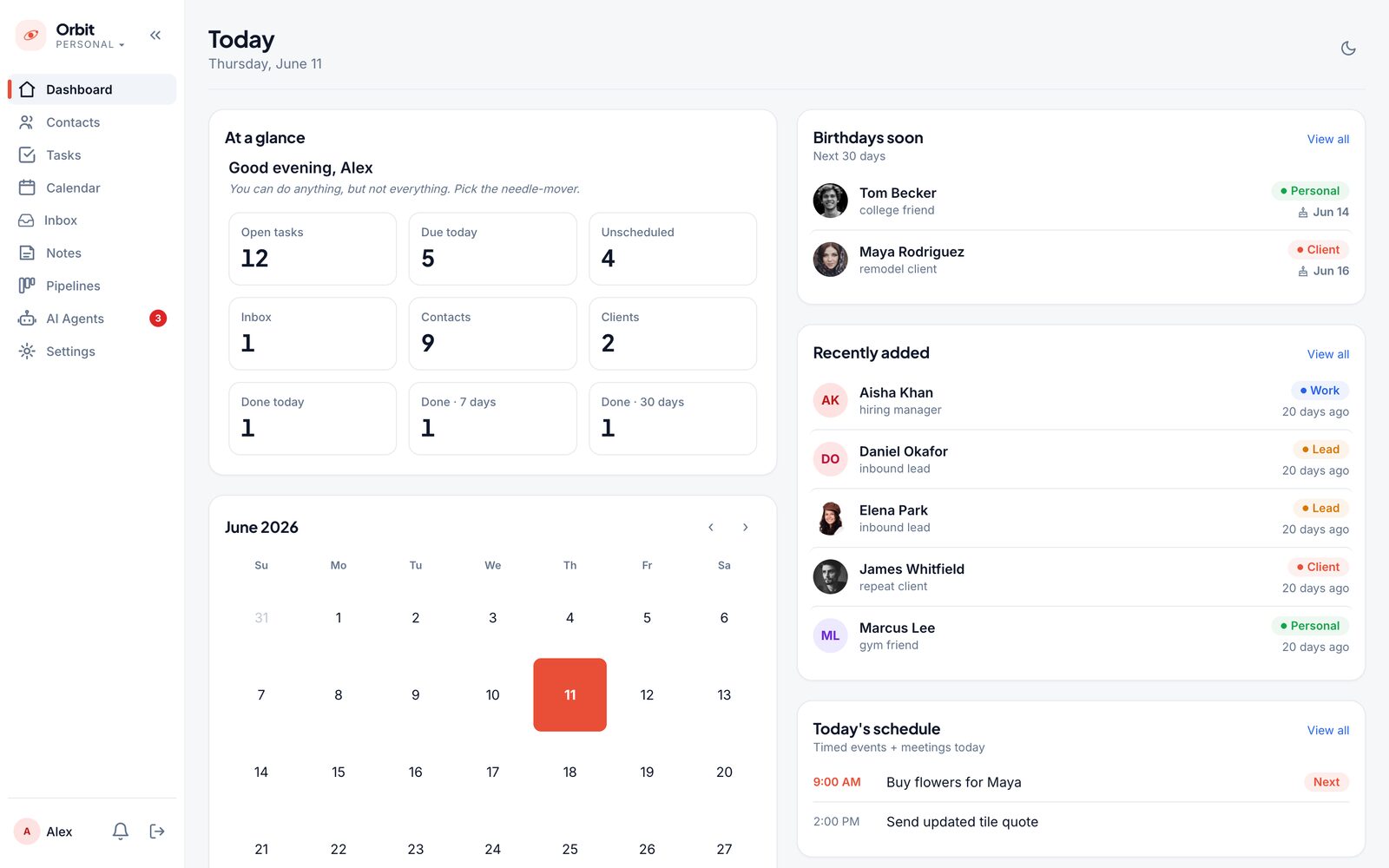
The whole operation, visible at a glance.
Built by Neil. Screens show demo data.These are examples of what we could build together. Choose a recurring process where a clearer system would make a difference.
Capture, qualify, route, and follow up while the opportunity is still warm.
Collect forms, files, decisions, payments, and progress without the email chase.
Match people, locations, capacity, and priorities without rebuilding the plan.
Move requests from intake to estimate, decision, signature, and delivery handoff.
See every active job, blocker, promise, owner, and next action in one place.
Watch for missing steps, prepare context, and surface the work that needs a person.
Build a system for the work that repeats. Give people more room for the work that needs their judgment.
Hire for expertise, customer relationships, and good judgment. Give those people the time and tools to do what you hired them for.
Let software collect information, move jobs forward, prepare reports, and flag missing steps. Start with one process and measure the admin hours, cost per job, and extra work your team can handle.
Practical automation
An agent can gather context, prepare a reply, or flag a missing step. I build it into your workflow with clear permissions, review points, and an activity history, so your team stays in control.
A new client asks for help with intake and follow-up.
The inquiry and relevant information stay together
The workflow surfaces what needs attention
A person reviews the message before it is sent
Permission: draft and recommend. Every action logged.
No technical brief required. The version with the exceptions is the useful one.
Show me how the work happens today, including the steps that only make sense once you explain them. We agree on a focused first outcome.
Click through the product while the important decisions are still easy to change.
Finish roles, data, integrations, agents, reporting, and the edge cases that matter.
Verify the system, train the team, and put the code, data, accounts, and documentation in your hands.
The agreed core workflow includes launch, handoff, and 30 days of stabilization. If it is not usable by day 30, I keep working on the original scope at no added build fee. Kickoff requirements and exclusions apply.

Neil Busque Designer & Developer
AI portrait based on Neil’s photographsI like getting into the details of how a business works and turning them into software that feels natural to use.
We make the important decisions together. I handle the design, build, testing, and launch. Sometimes the best answer is to improve a tool you already have. I’ll tell you when I think that’s the case.
Elizabeth, New Jersey. Available worldwide.
Let’s talk about your projectA clearer brief makes a better build.
A practical way to find the step that needs attention.
Read the note Fillable worksheetCapture the people, tools, information, and useful first outcome.
Open the Workflow BriefAnswer five practical questions and get a tailored opportunity brief in about three minutes.
A practical framework for choosing whether to buy, connect, or build.
See what changes the price and how to compare quotes by the working outcome.
Map the path from signed agreement to a client and team that are ready to begin.
Concrete jobs for lead response, inboxes, delivery, knowledge, and reporting.
Show me the app, the code, and where things get stuck. We review what works, what is fragile, and what needs to change: sign-in, permissions, saved data, integrations, or the steps behind the demo.
Some apps need a focused fix. Others need a deeper rebuild. We agree on scope and timing after reviewing what you have.
The practical details belong in the conversation, before the build starts.
Yes. We start by reviewing the existing app, code, and workflow to identify what can stay and what needs work. That may mean fixing a specific issue, finishing integrations and permissions, or rebuilding a fragile part. The scope and timeline are agreed after that review; an existing app does not automatically fit the 30-day build.
Pricing depends on the workflow, integrations, and scope. After a free call, you receive a clear proposal before committing. It includes the agreed core workflow, launch, training, documentation, and 30 days of stabilization. Hosting, third-party services, and future features are separate. Scope and ongoing costs are agreed before work begins.
When a repeated workflow creates enough manual effort, delay, risk, or customer friction that configuring another generic tool will not solve the underlying problem. The first call is partly for deciding whether a build is actually the right move.
A focused operations app, client portal, internal CRM, scheduling or quoting tool, reporting system, or AI-enabled workflow with a clear first boundary. It is one complete, usable system with a clear first boundary. Future features are scoped separately.
Agents can research, classify, summarize, monitor, draft, and recommend. Sensitive actions stay behind explicit permissions, human approval, and an activity log.
Usually. Reliable specialist tools can stay connected when they have a supported integration path. We decide what remains, what becomes the source of truth, and what should stop creating duplicate work.
You do. The code, data, database, design, accounts, and documentation are set up in your name and handed over. There is no required retainer or proprietary platform lock-in.
Let’s look at it together and find a useful next step.
Talk through your workflow 30 minutes with Neil. Free. No preparation needed.